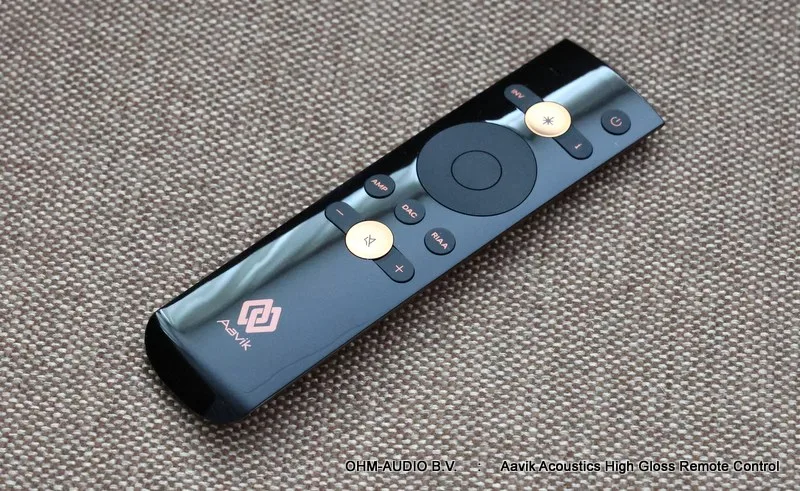
Aavik Acoustics Universal Remote Control, High Gloss Version
Item no. AAVREMOTEHG
In Stock
Go to cartDescription
Aavik Acoustics Universal Remote Control, High Gloss Version
New Price: € 195.00
EN.
General: The Aavik Acoustics Universal Remote Control High Gloss version can be used with all Preamplifiers, Power Amplifiers, Integrated Amplifiers, Unity Amplifiers, D/A Converters and Phono Preamplifiers from Aavik Acoustics from Denmark. It is an ideal replacement for the small Apple remotes that Aavik Acoustics supplied with their equipment, and this remote looks better than the remote that was later supplied with the 180/280/580 series. This remote is now standard with Aavik 188/288/588 and 880 equipment, but those who still have the small Apple remote or the later aluminum Aavik remote control can now order the new remote separately for use with their Aavik equipment. The great thing about this universal remote is that you only need 1 remote to operate all your Aavik devices, whereas the Apple remote was paired to 1 device and so for a separate Aavik Streamer/DAC/Integrated Amplifier combination you needed no less than 3 separate remotes, with this Aavik Universal Remote you only need 1 remote.
The remote can be set up with one button press to be used as a remote for amplifiers, DACs or RIAA (phono) preamplifiers.
This remote is made of plastic with a luxurious high-gloss appearance, the back is made of copper-colored plastic.
Buttons on the remote, from top to bottom and from left to right:
1.) Far right at the top, the Standby button, use this to turn your device on or off.
2.) The button called "INV". This button is purely for D/A Converters or equipment with a D/A Converter inside such as an Axxess Forté amplifier or an Aavik U-X88 amplifier. With this button you rotate the phase of the signal by 180 degrees. This is for recordings that are out of phase to bring them back into phase.
3.) The large shiny button with the star inside. This is the menu button, click on this button to enter the menu and then use the large circle below left and right to scroll through different settings, use up and down to change the current setting on the display.
4.) 'i' button. Information button, displays information such as internal temperature or the file format being played.
5.) The large circle in the middle of the remote. Selection Arrows, outside the menu you can use the arrows ← and → to switch inputs and the arrows ↑ and ↓ to control the volume. When you are in the menu you can use the arrows ← and → to scroll through different settings and the arrows ↑ and ↓ to change the current setting.
6.) Round button in the middle of the selection arrows. With this you can also turn your device on or off.
7.) The button called "AMP". Click on this button to use the remote with Aavik or Axxess amplifiers.
8.) The button called "DAC". Click on this button to use the remote with Aavik D/A Converters. (For use with Aavik Unity amplifiers with internal DAC or Axxess Forté amplifiers, use the Amplifier button)
9.) RIAA button, click on this button to use the remote with Aavik RIAA / Phono Preamplifiers.
10.) Volume Down with the button with the minus sign (-)
11.) Mute button, volume off. Also use this button again to unmute.
12.) Volume Up with the button with the plus sign (+)
Specifications:
Brand: Aavik Acoustics
Model: High Gloss Remote Control
Type: Remote Control for Aavik and Axxess equipment
Design: High Gloss Black Front, Copper Coloured Back
You may also like
Norstone Counter Spike, Floor Protector, Available in Various Colors
Telegärtner RJ45 Connector, Mountable without special tools, price per piece